I decided to use ChatGPT for resloving my problem. I made a screenshoot of the error message and sent it together with a prompt describing the issue.
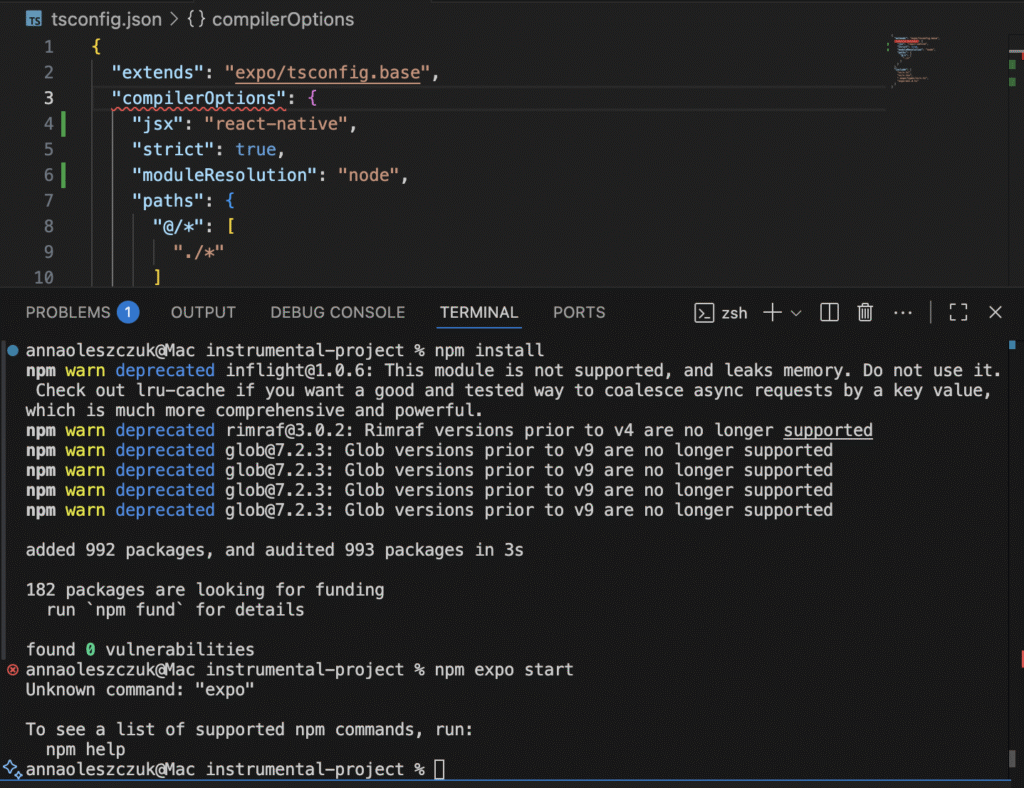
It didn’t work well, so I modified the prompt, and added “do a deep research”, and “all search from 2025”. It worked this time, and the output seemed to be correct. I followed these instructions and my problems were resolved.
This is a part of ChatGPT’s response to my problem. It generated the text together with links to the React Native documentation:
Why your errors happened (mapping to your screenshot)
- “Unknown command: ‘expo’” → you ran npm expo start. Use npx expo start. Expo Documentation
- “Cannot use JSX unless the ‘–jsx’ flag is provided” → tsconfig.json didn’t set jsx: “react-native” or VS Code wasn’t seeing the Expo base config. Fixed in step 2. Expo Documentation
“File ‘expo/tsconfig.base’ not found” → happens if the expo package isn’t installed or node_modules is missing/corrupt. Step 1 fixes that. Expo Documentation
Source: ChatGPT
I told about the error to my tutor, and she said that I made a mistake when tried to run my project on my laptop for the first time because I didn’t run the general npm install to begin with my project. I need to remember abut this command every time when run a React Native project on a new machine.
Leave a Reply